The engine at a glance
Every promotion in Wapping is built on the same four pillars, whatever its form: who it targets, when it's active, what benefit it grants and how it's communicated.
Marketing sets the strategy. Wapping automatically executes the promotion rules across all channels.
Marketing launches any of these promotions from Wapping Manager, without touching the POS, ERP or ecommerce: the rule is calculated in real time at checkout and delivered to the point of sale with the result ready to apply.
One-to-one personalised promotions
A different type of promotion can be activated for each profile, without building anything new each time.
Even when unidentified: an unidentified customer can receive a generic promotion, while each loyalty member receives their own, tailored to their profile.
Promotions: %, fixed discount, price change
The same engine supports different types of benefit, applied to the entire receipt or only to certain items.
Example: 3% savings on a selection of items: if the customer buys 3 products at €10, €20 and €50, they earn 3% × €80 = €2.40. Or shoes priced at €85 reduced to €69 during the promotion.
Conditional promotions (3 for 2, if X then Y)
The condition and the reward can be completely different items.
Examples: 3 for 2: buy 3 units of X and get 1 free. Or buy a dress and get 2 T-shirts at 30% off.
Promotions that add points or cashback
Instead of a discount on the receipt, the promotion credits a percentage of the purchase as points or cashback to the customer's savings programme, to be used on a later purchase.
Illustrative example: 5% of the purchase as extra cashback for top-tier members and 2% for everyone else. On an €80 purchase, some get €4.00 and others €1.60 of balance for their next purchase, instead of an immediate discount.
Keep in mind: it requires an identified customer, because the balance is credited to their wallet.
Bundle promotions
A discount that only activates when the customer buys the complete bundle, not a single unit.
Example: "complete outfit" bundle: trousers + shirt + belt with a combined 15% discount, and no discount if bought separately.
Bounce-back coupons
The condition is met today, but the benefit is saved to be used on a later purchase.
Example: if you buy 2 bottles of Almazara olive oil, you get a 20% coupon for Almazara vinegar on your next purchase.
Tiered promotions
Set spend thresholds: each tier a customer reaches unlocks a bigger benefit.
Illustrative example: 5% off a spend of €50 or more, 10% off €100 or more and 15% off €150 or more. A €120 basket reaches the second tier and gets 10% off: €12.00.
Cross-selling promotions
A promotion that encourages customers who buy from one category to try a complementary one.
Illustrative example: customers who bought red wine in the last 60 days but have not bought whisky get 10% off whisky.
Not the same as a conditional promotion: a conditional promotion is triggered by the contents of the current receipt, whereas a cross-selling promotion targets an audience built from purchase history.
Upselling promotions
A promotion that encourages customers who bought the basic model to step up to the premium one.
Illustrative example: customers who bought €40 running shoes in the last 18 months get €15 off the €80 model, so they pay €65.
Impact
0 POS/ERP set-up
Every new promotion is launched from Wapping Manager, with no additional development.
1 engine, all channels
The same rule is calculated the same way in store, online, in the app and in the customer wallet.
Unlimited combinations
Nine core mechanics that can be combined to fit any commercial strategy.
See it in Wapping Manager
Every promotion is built with the same wizard: promotion type, condition, benefit and audience. Once published, it's applied automatically at checkout in physical stores and ecommerce with no further steps.
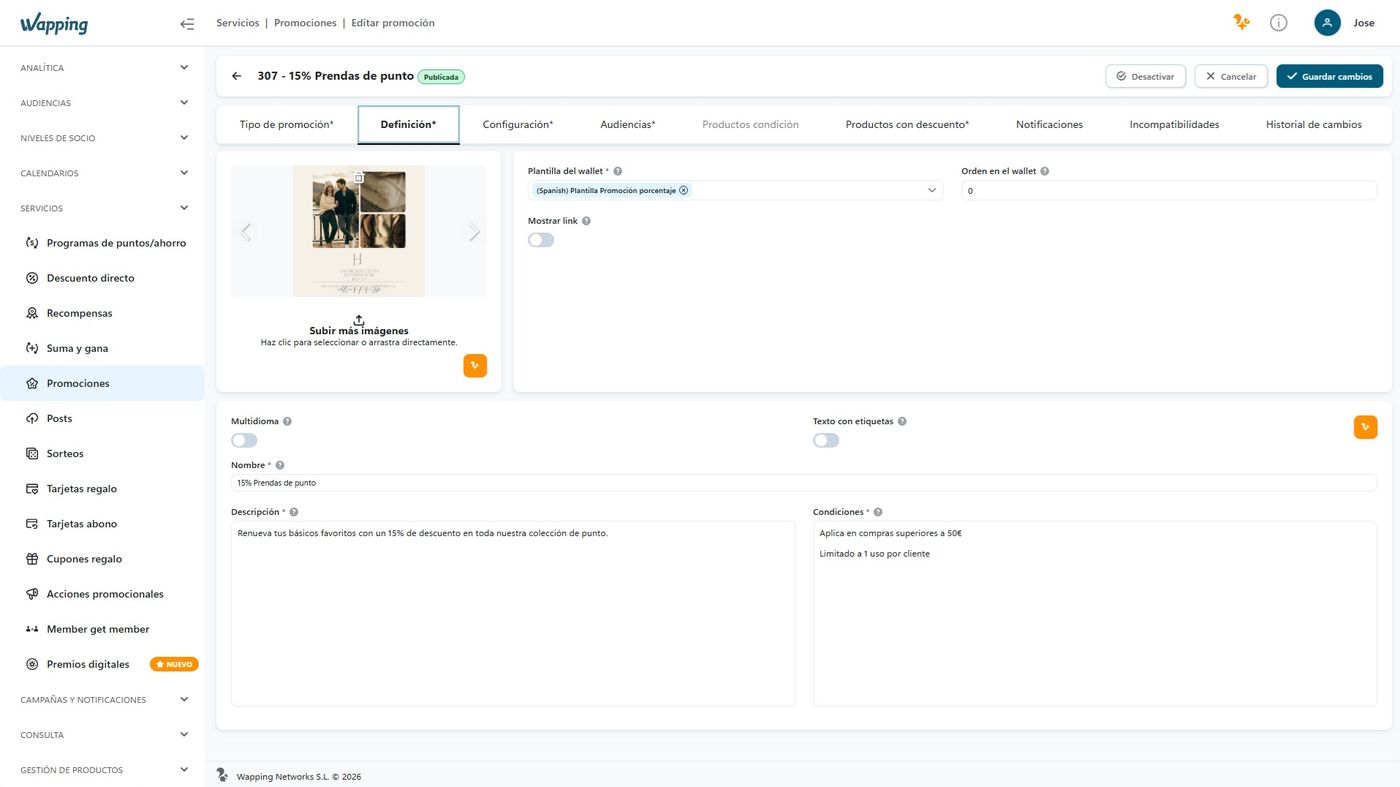
Promotions

Use case: marketing
For the season launch, marketing combines several mechanics from the same engine: a 3 for 2 offer on the new collection to drive volume, a "complete outfit" bundle with a combined discount and a bounce-back coupon in the complementary category for customers who have already purchased. All configured from the same panel, without relying on IT, and applied the same way in store and online from day one.
Frequently asked questions
It depends on the incompatibilities configured in each service: you can let several promotions stack or set one to exclude another.
No. Once integrated, any promotion is configured from Wapping Manager and applied automatically across all connected channels, with no additional development.
Yes: a maximum number of uses per customer and, on top of that, a maximum total number of promotions redeemed across the entire customer base.
Yes. The same rule is calculated in real time and applied identically in physical stores, ecommerce, the app, the customer wallet or any connected channel.
A discount is applied to the current receipt. An add-points promotion credits a percentage of the purchase as points or cashback in the customer's savings programme, to be redeemed on later purchases. It requires an identified customer, because the balance is stored in their wallet.
Yes. You set spend tiers and each one unlocks a bigger benefit, on the whole receipt or on specific items, with the same control over calendars, stores, usage limits and incompatibilities as any other promotion.
You create an audience in the CDP based on purchase history (for example, customers who buy from one category but have not bought a particular product, or who bought the basic model) and target it with an offer on the product you want to promote, with its own calendar and notification channel.
We'll show you how to build your first campaign using your own catalogue and audiences.