Request a demo See FAQs

The challenge

Communicating well shouldn't depend on a separate tool

When email marketing, SMS and WhatsApp live in tools separate from the CDP, every campaign forces you to export audiences, recreate segments and lose touch with what you actually know about the customer. The result: generic messages, disconnected from real behavior, that land at the same time with customers who just bought and those who haven't been back in a year.

Two ways to communicate, one engine

Automated by event, or campaigns on demand

Wapping communicates in two different ways. This page focuses on the second: building campaigns and templates.

Automated, by event

Triggered automatically when something happens in a Loyalty service: a promotion lands in a customer's wallet, they move up a tier, or they earn enough points to redeem a reward. Set up within each service.

See it in each service

Campaigns, on demand

Instant or scheduled, with the frequency you need: every X minutes, hours, days, weeks or months. The focus of this page.

What we cover here

How it works

Message builder, templates and scheduling

Each campaign combines an existing template, a channel, a language, and the audience segment it targets.

Channel-based message builderEmail, SMS, WhatsApp, Push Mobile, APP or Mobile Pass, each with its own template format.
Fixed and variable partsParameters such as {customer_name} that the system replaces automatically in each send.
Real-time previewSee how the message will look on desktop and mobile before publishing the template.
Test sendCheck the template with real data by sending it to an email address or phone number before launching it to the full audience.
Flexible schedulingStart and end date, with frequency in minutes, hours, days, weeks, or months.
Built-in send analyticsDeliveries and open rate, visible directly from the campaign itself.
Email
SMS
WhatsApp
Push
APP
Mobile Pass

All on one platform: understand the customer with the CDP, segment them into precise audiences, and launch personalized communications without leaving Wapping or connecting external tools.

Benefits

Why it matters for the business

Every event has its message. Every message, its channel.

  1. One event, any channel. Each customer or business action can trigger a notification by Email, SMS, RCS, WhatsApp, Push, or APP, without duplicating the logic in each service.
  2. Reusable templates by channel and event. Define the message for each event once, with fixed and variable parts, and reuse it in as many services as you need.
  3. Automated or scheduled campaigns. Link a communication to a customer event, or schedule it with a start date, end date, and frequency, with no manual intervention.
  4. Instant communication right at checkout. Show the result on the checkout screen, to the sales associate, or printed on the receipt: ideal for prize draws and benefits resolved on the spot.
  5. Measurable results from the first send. See how many notifications have been delivered and their open rate, directly from each campaign.

Impact

What your business gains

Understand, segment, and communicate

The three steps on the same platform, without exporting or reconnecting audiences.

8 native channels

6 direct customer messaging channels (Push, Email, SMS, WhatsApp, RCS, and in-APP) and 2 indirect ones (receipt and display), from a single builder.

Tailored frequency

From minutes to months: the campaign repeats exactly when needed.

See it in Wapping Manager

From template to scheduled campaign

Edit each template with a live preview, and set up each campaign by choosing the event or frequency, segment, channel, language, and template, with send analytics right alongside.
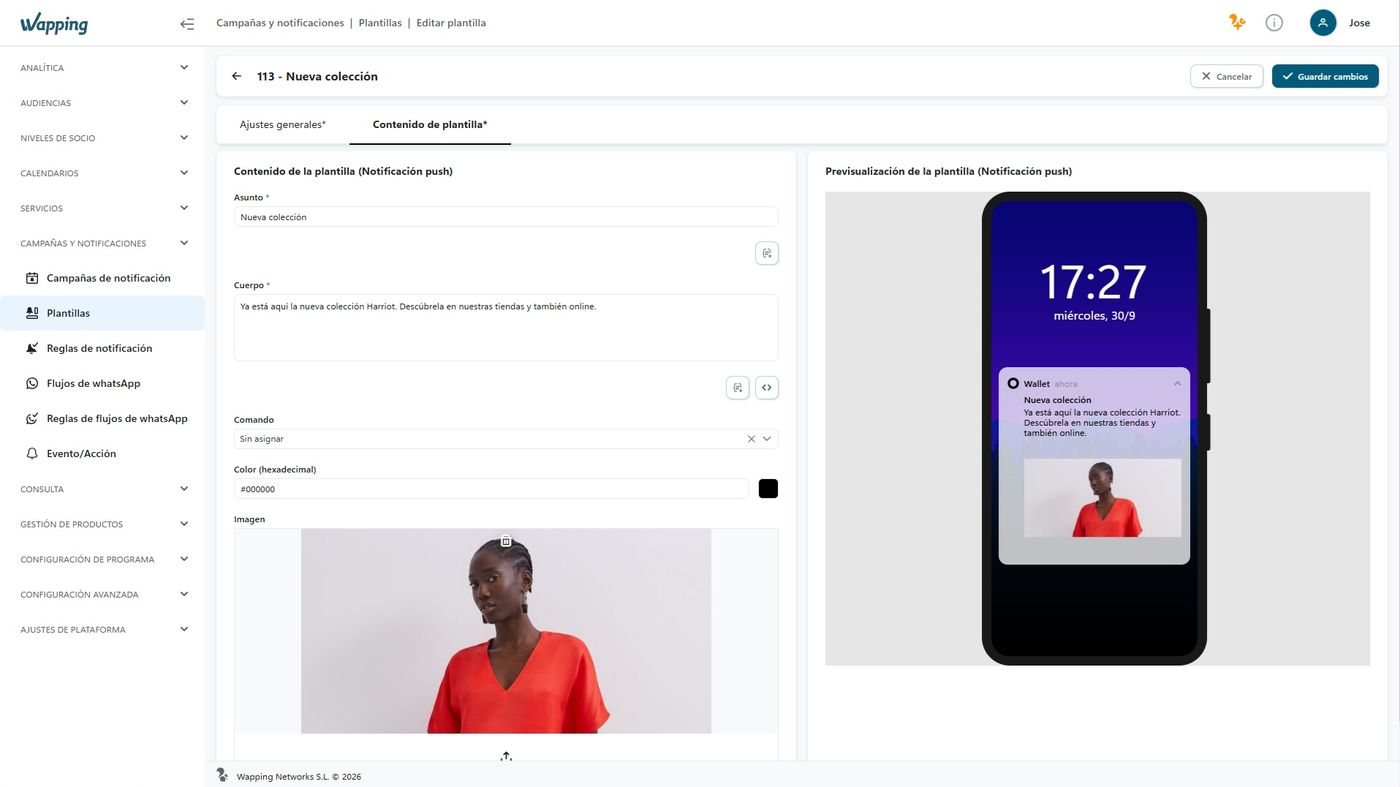
Wapping Manager: push notification template editor with preview

Campaigns and notifications
Wapping Manager – Campaigns and notifications

Wapping vs. the traditional approach

From separate tools to a single engine connected to the CDP

AspectTraditional approachWapping
Audience sourceExported from another toolLive segments from the same CDP
Available channelsOne or two, with separate integrationsNative Email, SMS, WhatsApp, Push, APP, and Mobile Pass
Communications tied to servicesRequire custom developmentAutomated, already integrated into each Loyalty service
Results measurementOn another platform, disconnected from salesDeliveries and opens from the campaign itself

Illustrative example

From a CDP segment to a scheduled campaign

This is how a reactivation campaign is built, from start to finish.

Segment from the CDP"Customers with no purchase in the last 60 days," already created in Audiences
Reactivation templateDesigned once, with desktop and mobile preview
Sent by Email and WhatsAppTwo templates, one per channel, for the same campaign event
Scheduled every 30 daysRepeats automatically as long as the segment remains active
Deliveries and opens at a glanceCampaign analytics in the same panel

Use case — Marketing

Reactivate dormant customers without writing a single line of code

The marketing team spots a segment in the CDP of customers who haven't purchased in two months. Instead of asking IT for an export, they create the audience directly in Wapping, design a reactivation template for Email and WhatsApp, and schedule the send every 30 days for as long as the segment exists. All from the same screen where they already analyze those customers' behavior.

Our customers drive us to keep innovating

Silbon logo Sally Beauty logo Mayoral logo Kamado Asian Food logo Avenida Perfumerías logo Perfumerías Facial logo Roberto Verino logo Prissa logo Armas Trasmediterránea logo Gadis logo Sibuya Urban Sushi Bar logo JL logo Pádel Nuestro logo Paco Perfumerías logo Silbon logo Sally Beauty logo Mayoral logo Kamado Asian Food logo Avenida Perfumerías logo Perfumerías Facial logo Roberto Verino logo Prissa logo Armas Trasmediterránea logo Gadis logo Sibuya Urban Sushi Bar logo JL logo Pádel Nuestro logo Paco Perfumerías logo

Frequently asked questions

Your questions, answered

What is the difference between an automated communication and a campaign?

An automated communication triggers on its own when an event occurs within a Loyalty service: a promotion enters a customer's wallet, they move up a tier, or they earn the points to redeem a reward. A campaign is a marketing action launched instantly or on a schedule, with its own frequency, targeted to an audience segment.

How many channels does the message builder support?

Email, SMS, WhatsApp, Push Mobile, APP notification, and Mobile Pass, among others, each with its own template format.

Can a campaign be tested before sending it to the entire audience?

Yes. Each template can be previewed in real time, in both desktop and mobile versions, and sent as a test to an email address or phone number before launching the full campaign.

Can every campaign be targeted to a specific customer segment?

Yes. Any campaign, automated or scheduled, is targeted to an audience segment created in the CDP, so the message reaches only the customers it's relevant to, not your entire customer base.

The right message, to the right segment, at the right time

We'll show you how to build your first campaign using your own CDP audiences.