Request a demo See FAQs

The challenge

Stop treating one-time shoppers the same as weekly regulars

Without tiers, every customer gets the same treatment by default, or someone has to manually check who deserves special treatment. The result: your best customers feel their loyalty goes unnoticed, and occasional shoppers have no clear incentive to become regulars.

How it works

Each tier is defined by a segment

Tiers aren't a fixed table: they're built on the same dynamic CDP segments, so they can be based on spend, number of purchases, or any other rule your business needs.

Segment-based membershipEach tier is linked to a customer segment you've already created in Audiences.
Automatic daily evaluationEach customer's tier membership is recalculated every day, with no manual intervention.
Its own rank and colorEach tier has its own rank, image, icon, and color, also used on the Mobile Pass.
Notification on every changeCustomers get notified when they join a tier or move up to the next one.
Amount left to the next tierIt's calculated dynamically and can be shown in the customer's wallet.
Visible or hiddenYou decide whether customers see their tier in the wallet; benefits apply either way.

Illustrative example

Each tier builds on the privileges of the one before

Here's how a fashion retailer sets it up: three tiers, each adding a new benefit while keeping the ones before.

Basic tier

The starting point

  • 5% discount in the savings program
Middle tier

Everything above, plus

  • Basic tier privileges
  • Free returns
Top tier

Everything above, plus

  • Middle tier privileges
  • Free alterations

Benefits

Why it matters for the business

  1. 100% automatic classification. No one has to manually check who moves up or down a tier: it all recalculates on its own, every day.
  2. Visible, progressive benefits. In their wallet, customers see their current tier and what they need to reach the next one, which encourages repeat purchases.
  3. Communication at every milestone. Each tier change triggers a notification, reinforcing recognition at just the right moment.
  4. Integrated with Mobile Pass. Each tier's color shows up directly in Apple Wallet and Google Wallet.
  5. Flexible rules, not just spend. Because tiers are built on segments, they can be defined by number of purchases, specific categories, or any other combination of criteria.

Impact

What your business gains

01

Automatic daily evaluation

Every customer in the right tier, with no manual work.

02

3+ tiers, no limit

As many steps as your strategy needs, each with its own segment.

03

Tier customization

Set your own image and icon for each tier in the customer's wallet, and give the Mobile Pass distinct colors and images for each tier.

See it in Wapping Manager

From setup to the customer record

When you set up a tier, you upload its image, icon, and color, choose the segment that defines it, and mark whether it's visible. Each customer's record shows their current tier; click it to see how they've moved between tiers over time.
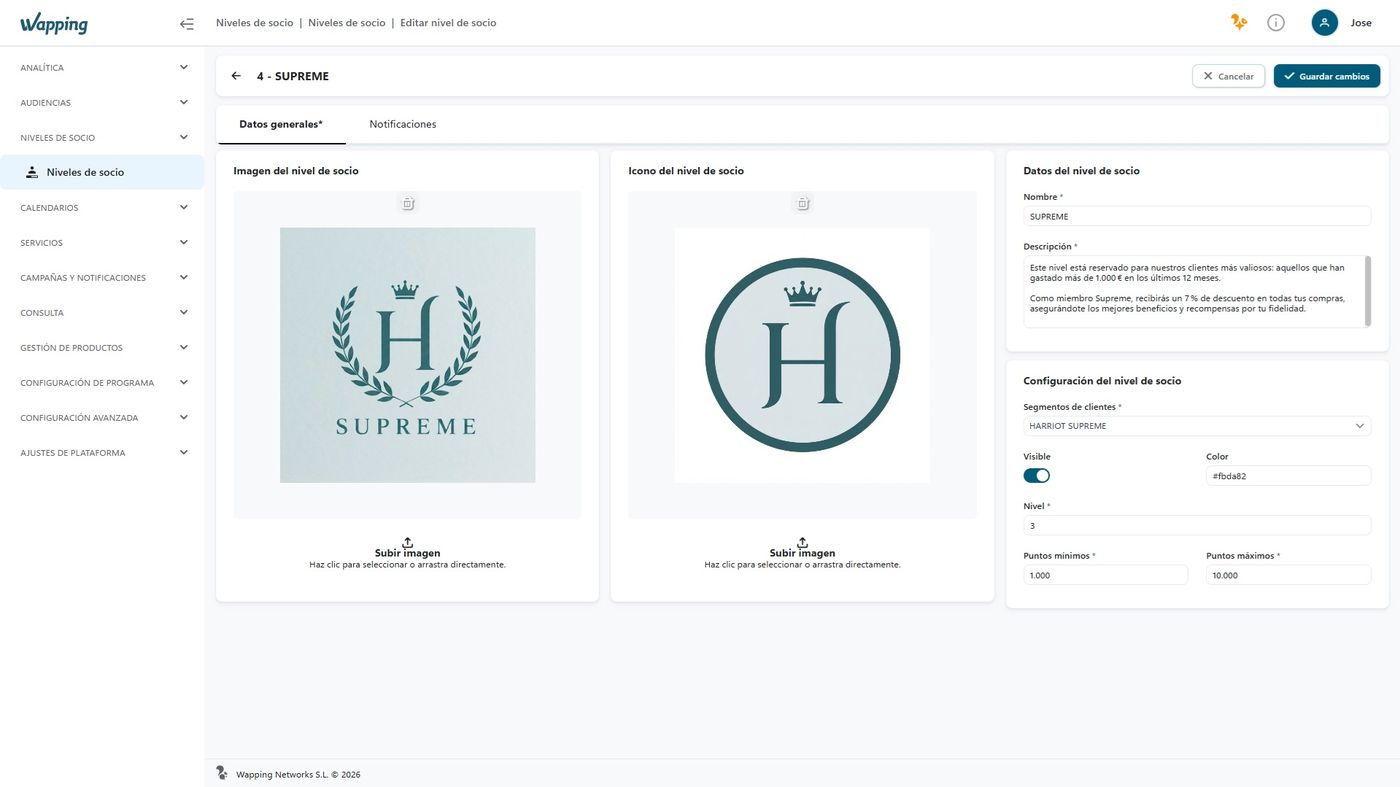
Wapping Manager: editing a member tier

Member Tiers

Wapping Manager – Member Tiers

Wapping vs. the traditional approach

From a static card to tiers that update themselves

AspectTraditional approachWapping
Tier evaluationManual review or one-off calculationAutomatic, every day
Membership rulesUsually cumulative spend onlyAny segment rule: spend, purchases, category...
Visibility for the customerProgress is rarely communicatedCurrent tier and what's needed for the next, in the wallet
Mobile Pass representationUsually not availableA distinct color per tier in Apple/Google Wallet

Use case — Marketing

Customers can see exactly what it takes to move up

Without visible tiers, a customer close to a spending threshold has no way of knowing it, and the extra purchase that would move them up a tier is lost. With Wapping, customers see in their wallet how much they need to reach the next tier, which on its own is an incentive to buy again, without marketing having to launch a single extra campaign.

Our customers drive us to keep innovating

Silbon logo Sally Beauty logo Mayoral logo Kamado Asian Food logo Avenida Perfumerías logo Perfumerías Facial logo Roberto Verino logo Prissa logo Armas Trasmediterránea logo Gadis logo Sibuya Urban Sushi Bar logo JL logo Pádel Nuestro logo Paco Perfumerías logo Silbon logo Sally Beauty logo Mayoral logo Kamado Asian Food logo Avenida Perfumerías logo Perfumerías Facial logo Roberto Verino logo Prissa logo Armas Trasmediterránea logo Gadis logo Sibuya Urban Sushi Bar logo JL logo Pádel Nuestro logo Paco Perfumerías logo

Frequently asked questions

Your questions, answered

What are member tiers in Wapping?

They're categories that group customers by purchasing behavior, usually the amount spent over a given period. Each tier has its own set of benefits and promotions, which grow at higher tiers.

How do customers move up a tier?

It's automatic and evaluated daily, based on the rules of the segment linked to each tier: amount spent, number of purchases, or other criteria within the defined period.

Can customers see their tier and what they need to move up?

Yes, if the tier is marked as visible: customers see it in their wallet along with the amount left to reach the next tier. It can also be hidden, and its benefits still apply.

Are tiers reflected in Apple Wallet and Google Wallet?

Yes, each tier can have its own color, which is used to represent the customer's tier on their Mobile Pass.

Let your best customers stand out, automatically

We'll show you how to set up your tier program around your own loyalty strategy.

Explore all Wapping loyalty servicesPoints, tiers, promotions, Gift Card, digital receipt and more, in a single omnichannel engine.
See all loyalty services →