Request a demo See FAQs

The challenge

A large catalog shouldn't depend on hand-made lists

When activating a promotion on "the summer collection" or "the slowest-moving stock" means selecting items one by one, every commercial action becomes slow and error-prone. With catalogs of thousands of products, keeping manual lists up to date is practically impossible, and the catalog can no longer be activated as quickly as marketing needs.

How it works

Rules instead of lists

A product segment is defined by rules, not by a fixed list, so it always stays up to date on its own.

Grouping criteriaFamily, category, brand, collection, tags, attributes, or any other catalog structure.
Combinable AND/OR rulesSimple segments or complex commercial conditions, combining multiple criteria.
Automatic updatesProducts enter and leave the segment on their own, as soon as their attributes or classification change.
Segment groupsOrganize related segments under the same group to analyze and manage them together.
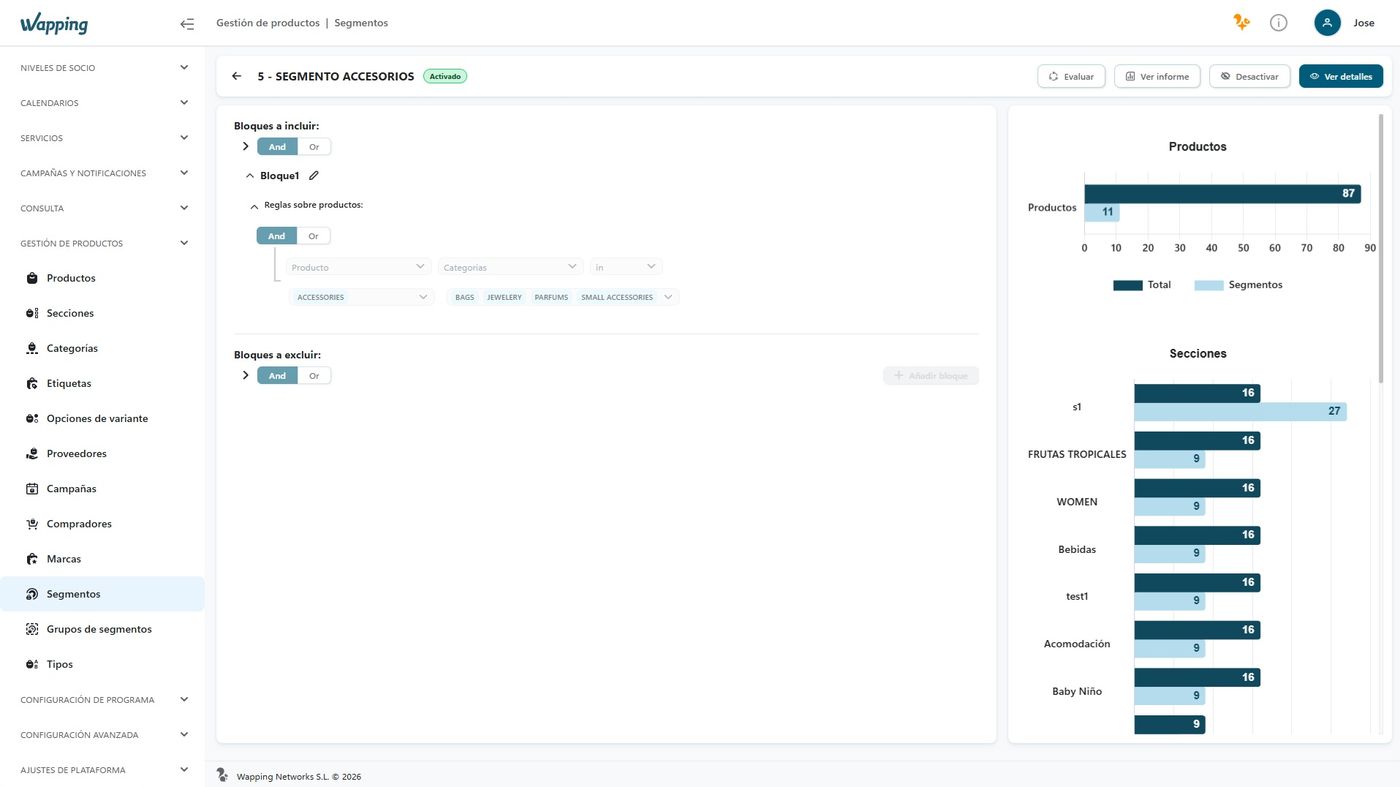
Activation statusFrom "processing" to "activated" (green circle) in a matter of seconds, with no manual intervention.
Built-in visual evaluationA Power BI panel shows in real time which products meet the segment's rules.

The same product segments are reused across promotions, loyalty services, or gamification: define them once and they're ready to power any commercial action, without reselecting items.

Benefits

Why it matters for the business

Commercial precision starts with catalog precision.

  1. Dynamic product audiences. Create product groups using families, categories, brands, collections, tags, attributes, or any other catalog structure.
  2. Flexible combination of criteria. Build simple or complex segments by combining multiple conditions to adapt them to any commercial need.
  3. Automatic segment updates. Products are automatically added to or removed from segments when their attributes or classification change.
  4. A catalog always ready for action. Use segments in promotions, loyalty, gamification, or any commercial initiative without having to select items manually.
  5. Scalability for large catalogs. Easily manage thousands of items through business rules instead of maintaining product lists manually.

Impact

What your business gains

Always up to date

No more manual list reviews every time the catalog changes.

Thousands of items

Business rules instead of manual lists, with no practical catalog limit.

Ready to activate

Each segment is instantly ready for promotions and loyalty services.

See it in Wapping Manager

From rule to segment, evaluated live

When you create the segment, you combine the rules you need, while embedded Power BI analytics on the right show in real time which products meet those conditions, with their activation status visible at all times.
Wapping Manager: product segment

Product Segmentation

Wapping Manager – Product Segmentation

Wapping vs. the traditional approach

From fixed lists to a catalog that organizes itself

AspectTraditional approachWapping
Product selectionManual lists, item by itemAutomatic rules by criterion
Catalog updatesLists have to be reviewed and correctedProducts enter and leave on their own
Condition complexityHard to combine several criteriaAND/OR rules with no practical limit
ScalabilityGets complicated with large catalogsBuilt for thousands of items

Illustrative example

Three segments, three different business rules

This is how criteria are combined to meet specific commercial needs.

Activated

Summer Collection

  • Category = Clothing
  • Collection = Summer 2026
  • Price > €40
Activated

Low-turnover stock

  • Turnover < 2 units/month
  • Age > 90 days
Activated

High margin

  • Margin > 40%
  • Category = Accessories

Use case — Marketing

Clear slow-moving stock without touching the rest of the catalog

Marketing wants to boost sales of low-turnover products, without affecting the rest of the catalog or asking IT for an export. It creates a product segment with the rule "fewer than 2 units sold per month over the last 90 days", activates it, and connects it directly to the Promotion Engine to launch a discount only on those items. If a product starts selling better, it leaves the segment automatically.

Our customers drive us to keep innovating

Silbon logo Sally Beauty logo Mayoral logo Kamado Asian Food logo Avenida Perfumerías logo Perfumerías Facial logo Roberto Verino logo Prissa logo Armas Trasmediterránea logo Gadis logo Sibuya Urban Sushi Bar logo JL logo Pádel Nuestro logo Paco Perfumerías logo Silbon logo Sally Beauty logo Mayoral logo Kamado Asian Food logo Avenida Perfumerías logo Perfumerías Facial logo Roberto Verino logo Prissa logo Armas Trasmediterránea logo Gadis logo Sibuya Urban Sushi Bar logo JL logo Pádel Nuestro logo Paco Perfumerías logo

Frequently asked questions

Your questions, answered

What is product segmentation?

It's the ability to create product subsets using dynamic rules based on multiple variables: categories, families, product lines, tags, buyers, and more. It gives you great flexibility in the actions you can run on your catalog.

How is a product segment activated?

You simply create it and process it: within seconds the segment is available with the defined rules, marked with a green circle and ready to use in promotions and services.

Can it be combined with customer segmentation?

Yes. Product segments and customer segments are complementary: you can target a promotion at a specific customer segment and apply it to a specific product segment at the same time.

How many criteria can be combined in a segment?

As many as you need, combining multiple rules and rule sets with AND and OR operators, for both simple segmentations and complex commercial conditions.

Your catalog, always ready to activate the next action

We'll show you how to segment your own catalog based on your business rules.